
What’s New on Unblu
Discover the latest feature releases, improvements, and updates
Message Broadcasting

.gif)
Broadcast messaging allows advisors to more efficiently share information such as investment opportunities, service updates, or greetings with multiple customers. Broadcasts can be initiated directly from the customer view by selecting customers using filters such as labels, opening a dedicated conversation thread for each customer where the topic can be continued asynchronously over time.
Broadcasts can also be initiated from the inbox, allowing the same message to be sent to multiple ongoing conversations in a single action. This streamlines outreach, maintains message consistency, and enables faster, more effective customer communication – all within secure and compliant messaging.
Conversation Summary


Advisors, agents, and supervisors can now generate summaries of chat conversations – providing a quick, consistent overview of each customer interaction. Teams can review or edit summaries based on their roles, helping reduce repetitive documentation tasks and improve consistency across teams.
Summaries can be automatically created when a conversation ends or is forwarded to another agent or team, allowing the next assigned agent to understand the context at a glance. Using customizable templates that define input, language, and structure, organizations can tailor summaries to their needs.
Rich Text Editor
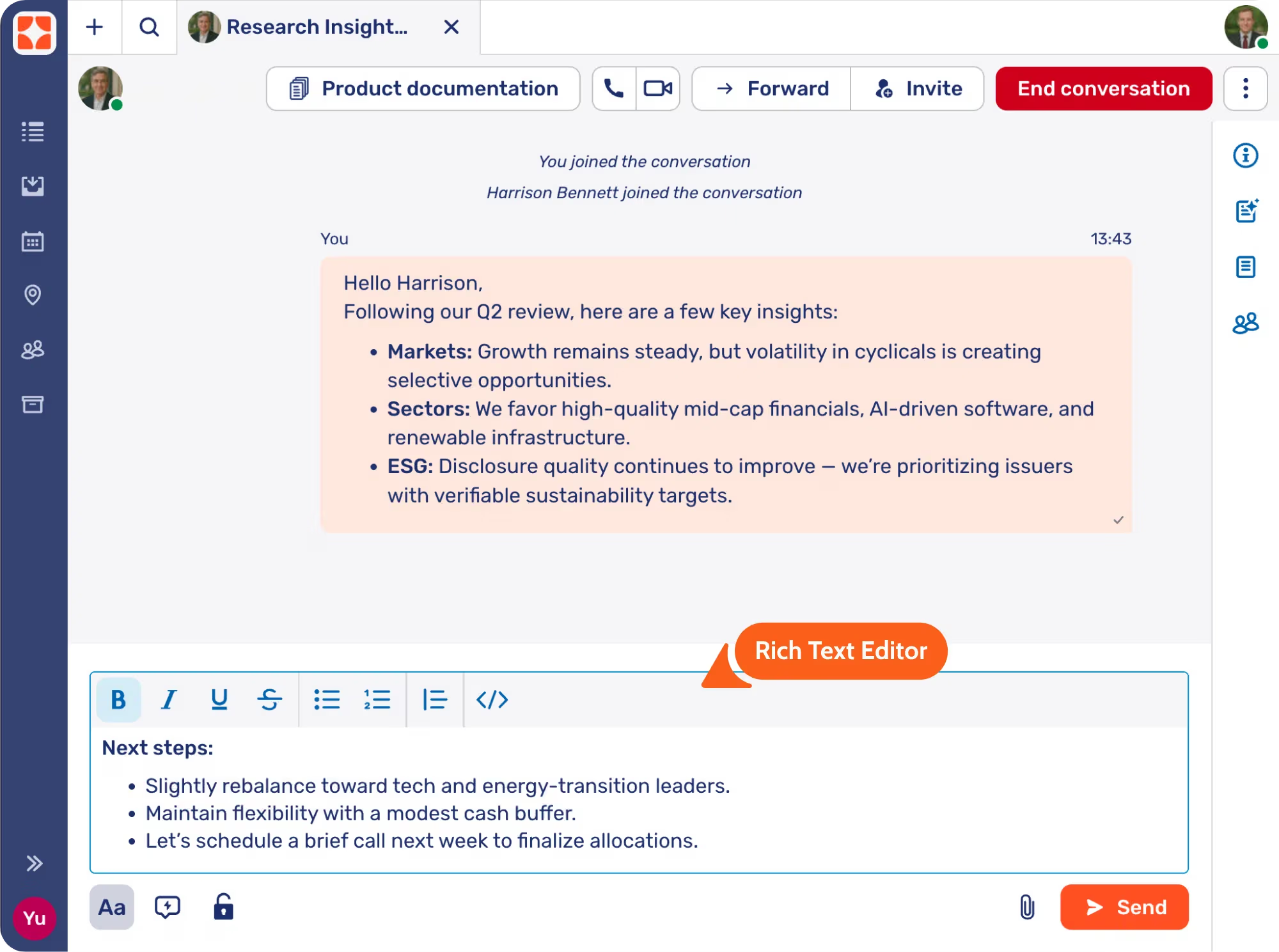
Advisors and clients can compose and view messages with a rich text editor, enabling formatted communication that’s clearer, more engaging, and easier to read. Similar to email threads but far more convenient, it allows users to share research updates, product information, or service details with structured formatting, such as bold text, bullet points, and headings.
Message Deletion

You can now configure who can delete messages – agents, customers, or both – and define exactly what and how messages can be removed. Whether deleting one’s own messages or others’, this feature gives users the flexibility to correct mistakes, remove personal information, and keep conversations clean and professional.
Deleted messages remain fully compliant with regulatory requirements: they’re marked as deleted but still securely stored in the database. This ensures privacy and user control while maintaining the auditability for financial services.
Outbound Co-Browsing & Co-Apping
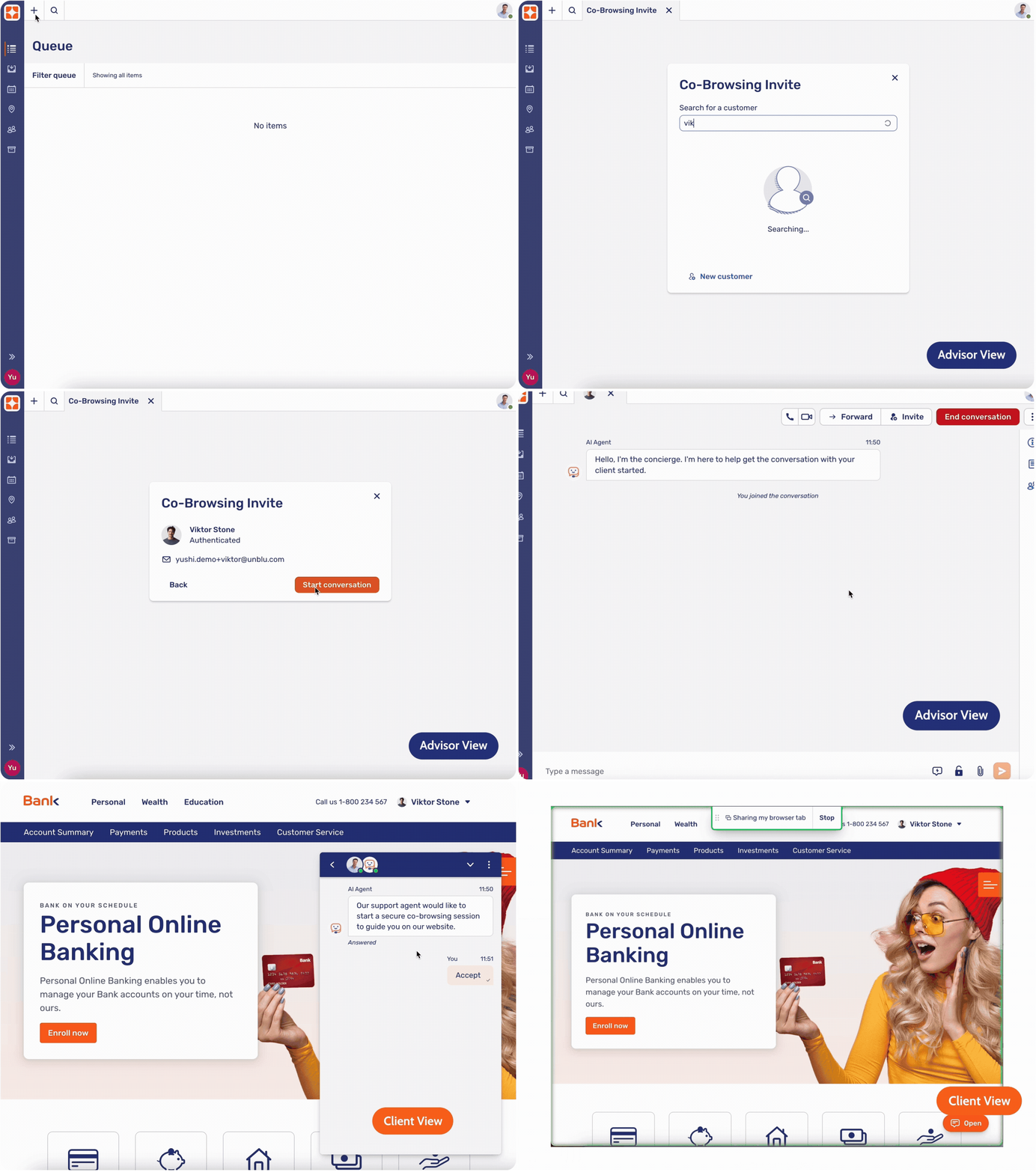
Agents can now guide customers on the banking portal, mobile app, or the bank’s website in a secure way through an outbound session request sent by the agents. When assisting customer on a call, the agent simply searches for the customer by name and triggers the request. Once the customer logs into their account, they will see a message appear inviting them to accept and begin the session.
This feature removes the need to share and enter a session code, supports financial institutions with strict anti-fraud policies, and makes it simpler for customers to start collaborating with the agent in real time.
Full Text Search
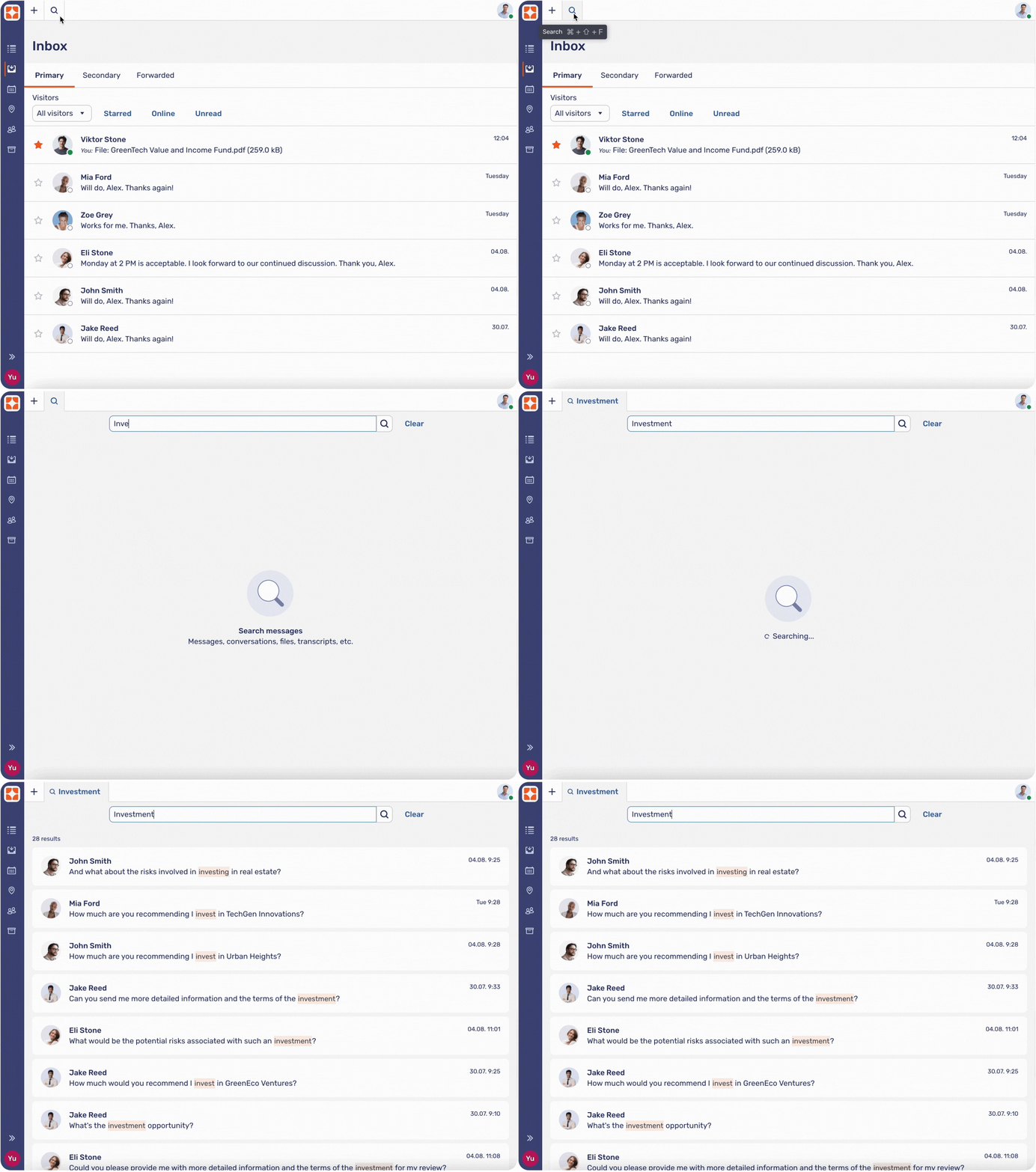
Advisors and agents can search for specific messages within conversations, making it easier to locate important details in ongoing or past client threads. Search results are displayed based on the user’s permissions and access, ensuring that sensitive information remains secure and compliant at all times. This capability is particularly useful for long-running discussions where key information might be located among weeks or months of exchanges.
Document Collaboration on Mobile
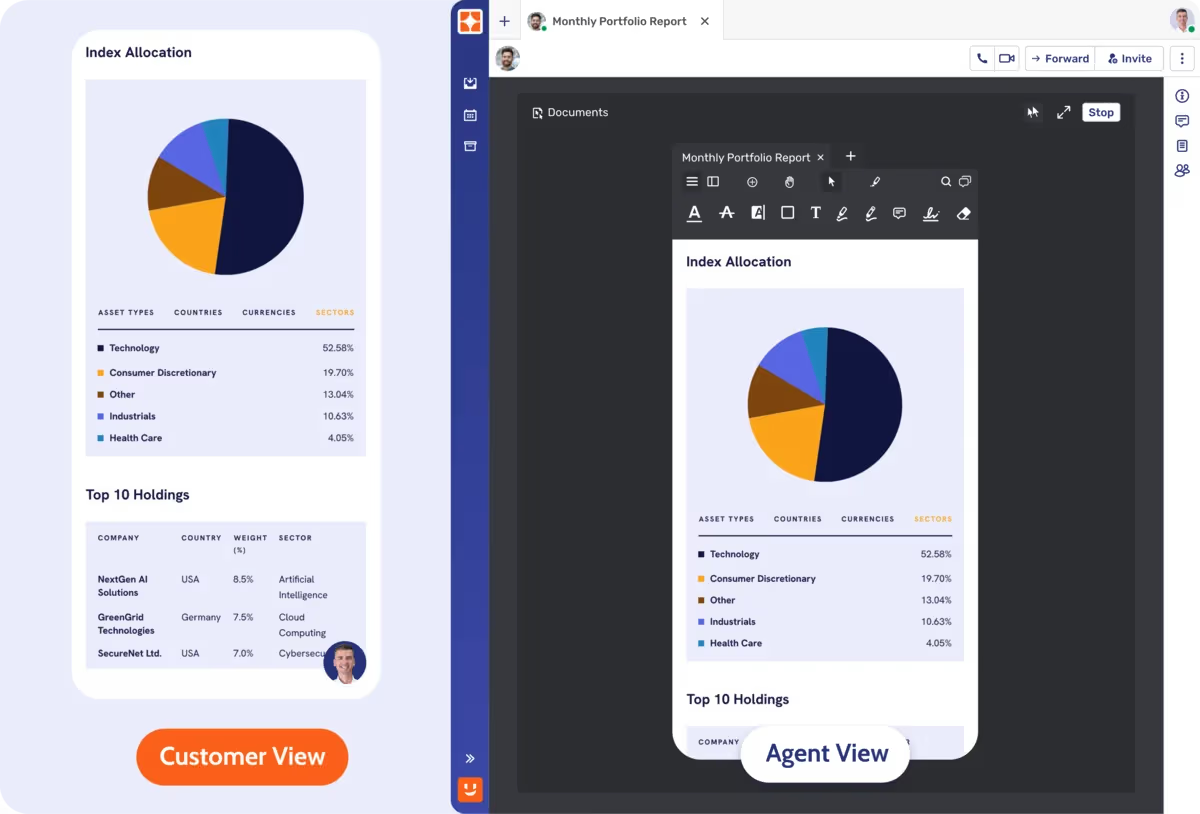
Unblu now enables real-time Document Collaboration on mobile, allowing clients to view documents during conversations with their advisor — whether over chat, voice, or video — all within the bank’s app. While clients can follow along with the discussion on-screen, advisors can guide the interaction with highlights, annotations, comments, and other visual cues to support clearer understanding and decision-making.
Typical use cases include reviewing mortgage proposals during a video consultation, walking through investment reports in a chat conversation, or guiding a client through onboarding documents on a call — all from the convenience of a mobile device.
Sharepoint Connector for Knowledge
The new SharePoint Connector enables Unblu agents and advisors to access knowledge sources through the Bot Sidekick directly from your organization’s SharePoint environment. With simple configuration, agents and advisors can securely retrieve and suggest content from SharePoint during customer interactions – based on each user’s specific access rights. How it works:
- Connect to SharePoint: Use the out-of-the-box connector to add your organization’s SharePoint instance as a knowledge source.
- Authenticate per User: Content access is governed by each agent’s SharePoint permissions. The Bot Sidekick provides suggestions based only on what that agent is authorized to view
- Retrieve and Suggest: Generate responses or suggestions from the approved SharePoint knowledge base, with full security and compliance.
By leveraging user-specific authentication, this enhancement empowers organizations to maintain control over sensitive information while delivering faster, more personalized customer support and advisory.
Customer-Centric View and Dashboard
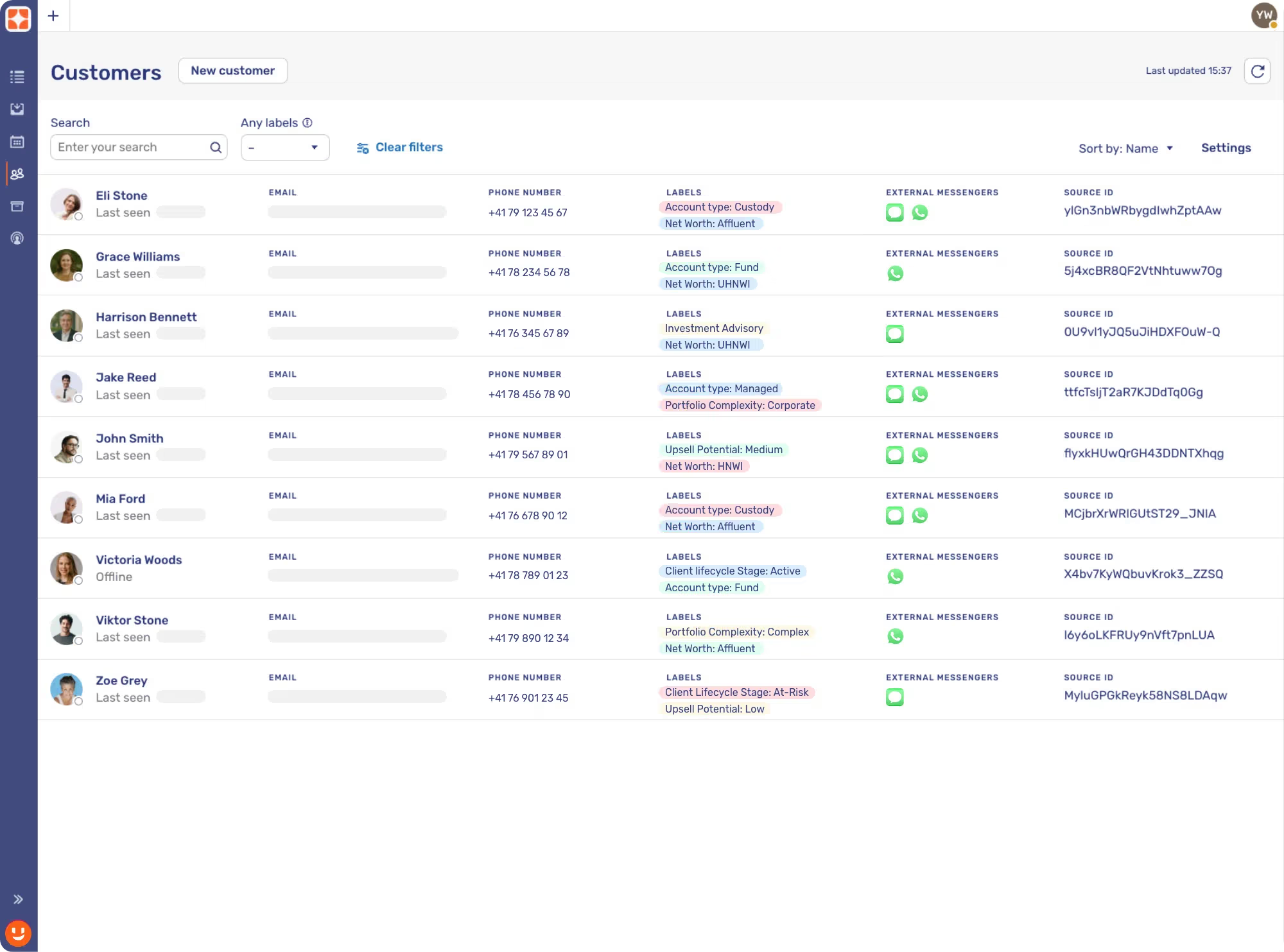
The Customer-Centric View and Dashboard provide agents and advisors with a comprehensive, searchable interface for managing and engaging with customers more effectively. This enhancement offers visibility into customer data, engagement history, and actionable insights. How it works:
- Search and Segment: Quickly find customers by name or using dynamic filters based on labels—such as location or upsell potential.
- View at a Glance: See available communication channels, previous conversations, and key profile details.
- Engage Smarter: Initiate outbound messages across supported channels—such as Secure Messenger, SMS, or WhatsApp—directly from the customer list.
- Explore Details: Access a dedicated dashboard for each customer with full interaction history, notes, and context for more personalized service.
Branch Integration into Unblu Spark
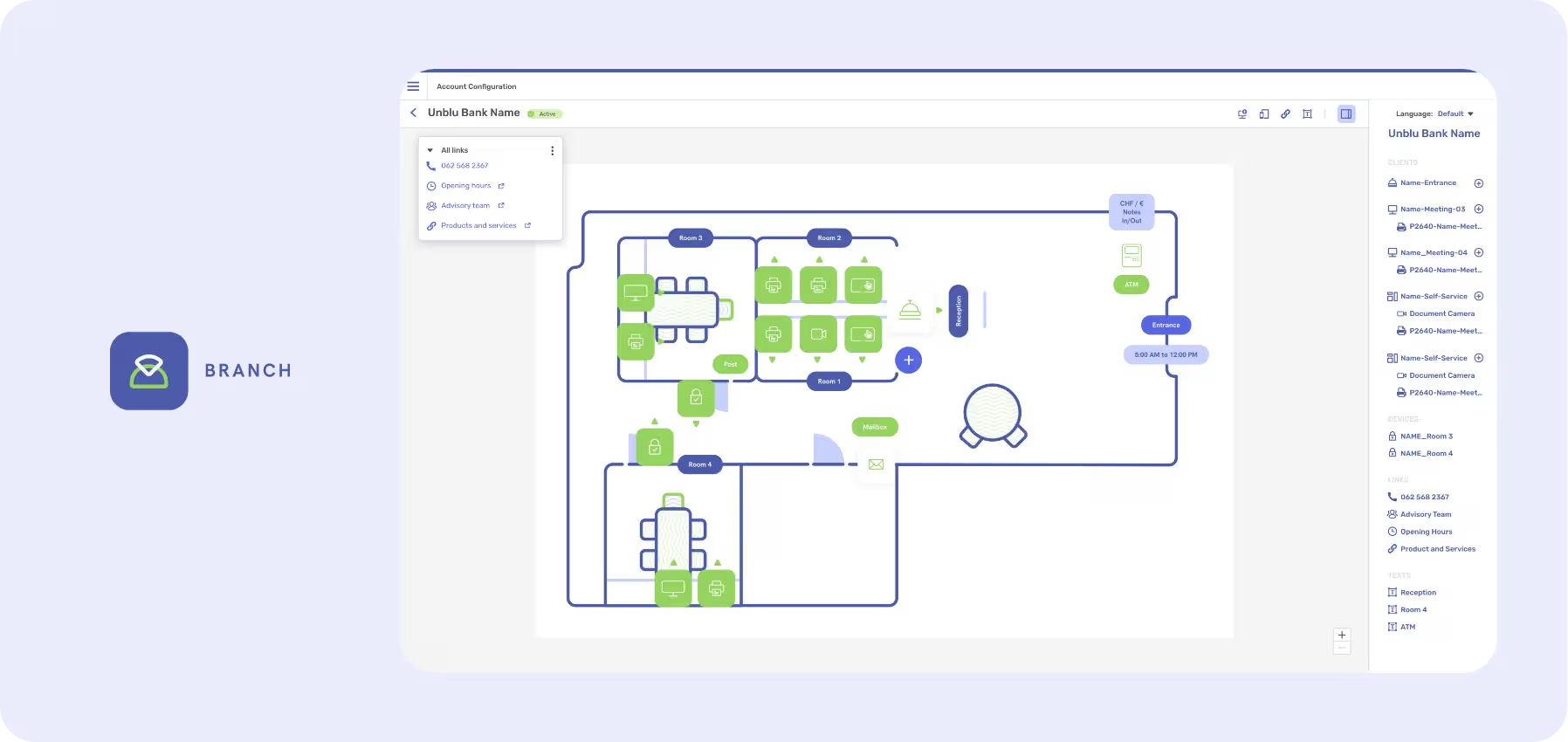
Branch is now fully integrated into the Unblu Spark platform – enabling a unified approach to both physical and digital customer engagement. Institutions can now operate seamlessly across channels while maintaining a consistent, secure, and efficient service experience.
For Unblu Spark Users: Physical branches can now be added as an extension of your existing Spark deployment. In addition to supporting and advising customers across web and mobile channels, you can now establish branches as an additional touchpoint—centralizing all interactions on a single platform. All digital tools, including co-browsing and AI-powered features such as live captions and call transcripts, are available during in-branch engagements, ensuring consistent service delivery regardless of location. Learn more
For Branch Users: Institutions already using Unblu for in-branch experiences can now unlock Spark’s full digital interaction platform, allowing you to expand your service offering beyond physical locations and engage customers on their preferred digital channels. Customers can move effortlessly from the branch to their personal device—resuming conversations on mobile, reviewing shared files, and continuing support interactions without interruption. Learn more
Enhanced Customer Rating
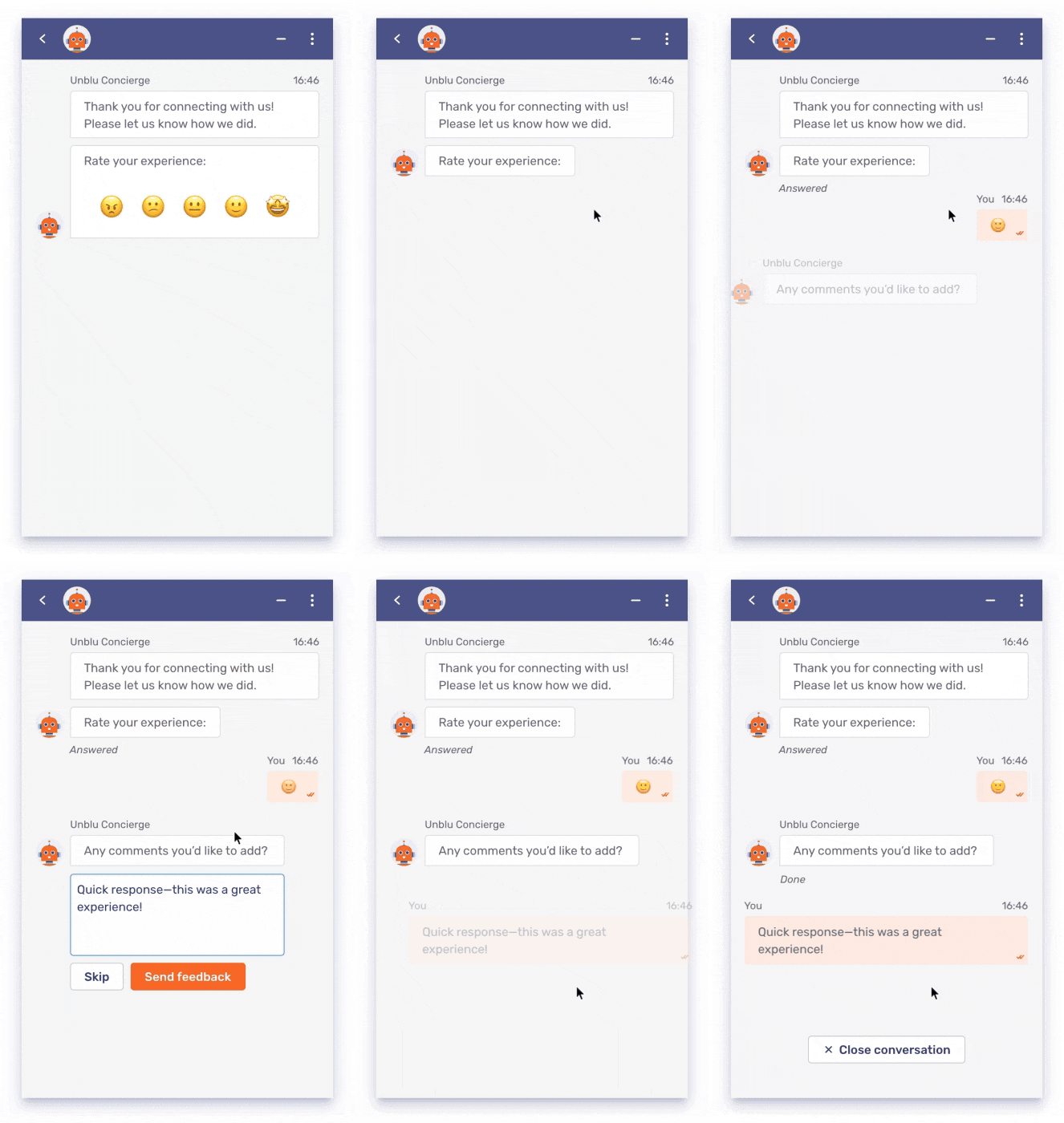
Understanding how customers feel about their interactions is key to improving service. That’s why Unblu now offers an emoji-based rating system, providing a more expressive and intuitive way for customers to share their experience.
This new option complements the traditional star-based system but allows customers to respond with a visual that better reflects their sentiment—especially useful in support environments where tone and emotion matter.
To help collect feedback more seamlessly, we’ve also introduced a new concierge offboarding task that prompts customers for a comment at the end of a conversation. This ensures timely, structured input to help teams continuously improve the customer experience.
Call Caption and Translation
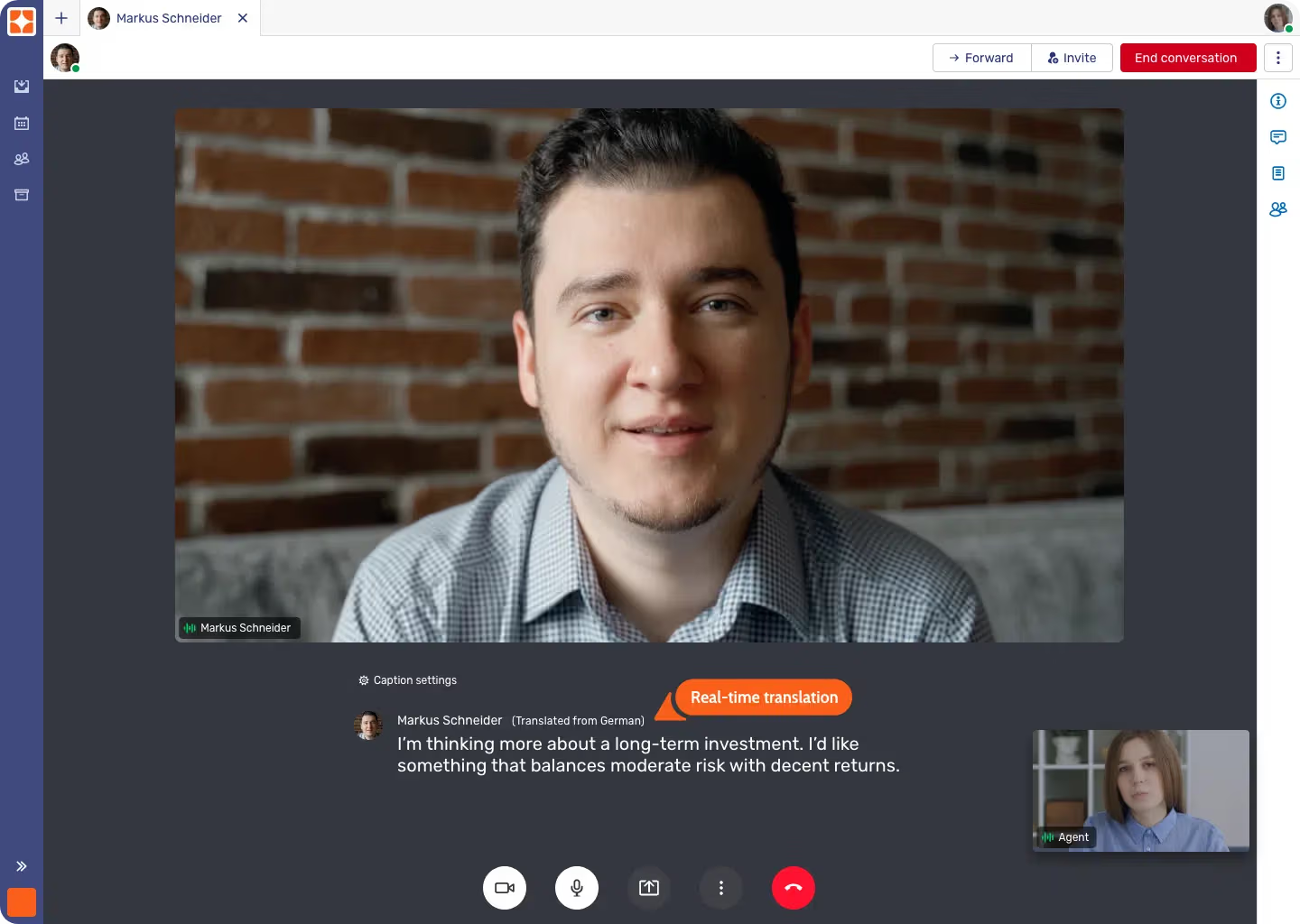
Clear communication is critical in financial services – especially during support calls where clients seek guidance on complex topics. With Unblu’s new closed captions for audio and video calls, institutions can now make conversations more accessible and easier to follow.
Unblu displays real-time captions during calls, with an option to translate them into the client’s preferred language. Whether clients face language barriers or hearing impairments, captions provide an additional way to follow the discussion, helping improve service quality.
Live Text Translation
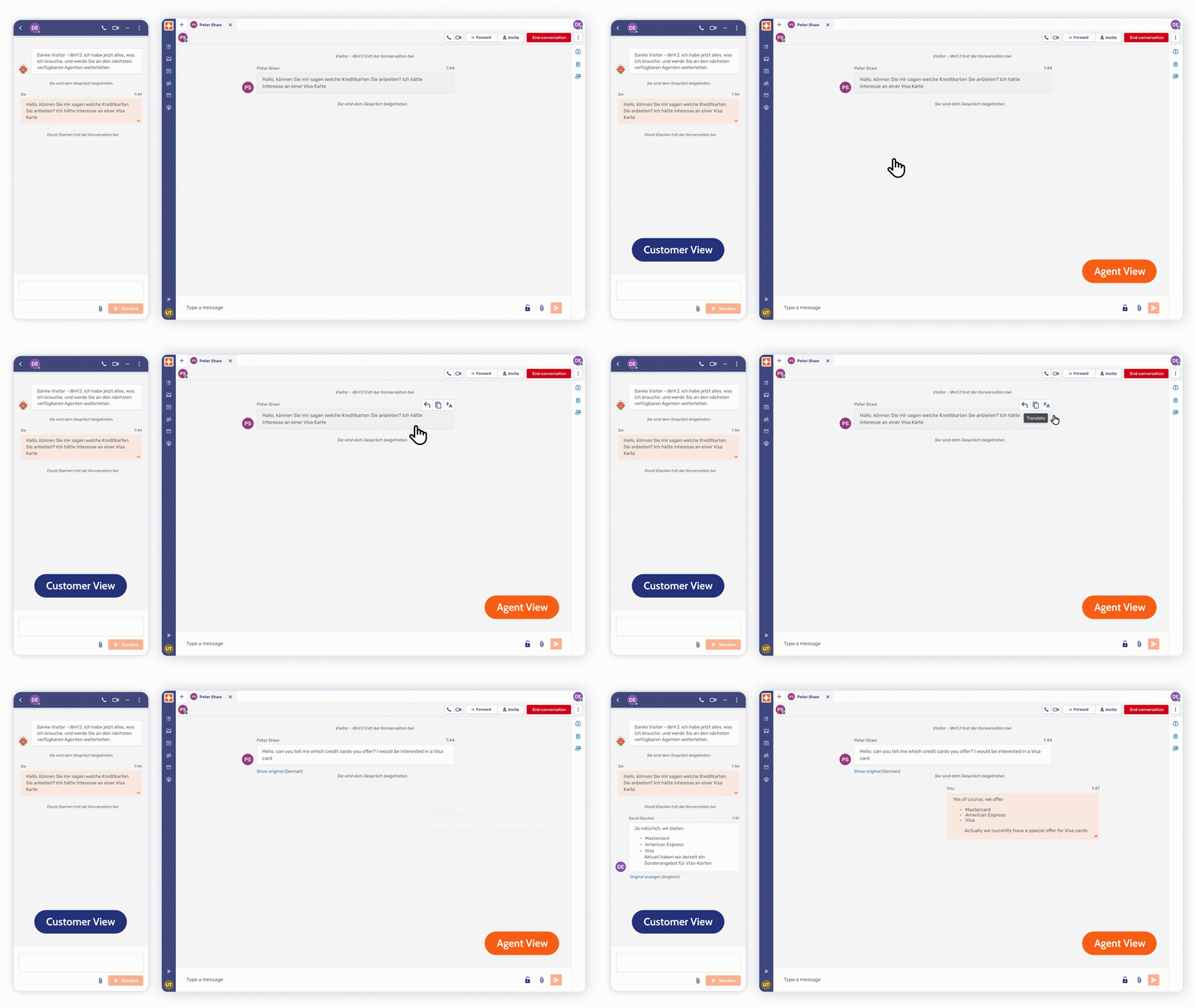
Automatic chat translation empowers agents to understand and respond to customers in any language, ensuring seamless communication without requiring multilingual skills. Here are the key use cases and benefits:
- Automatic Chat Translation: Agents can communicate effortlessly with customers in any language. Messages are automatically translated in real-time, ensuring clear and accurate conversations—without requiring agents to be multilingual.
- On-Demand Chat Translation: For agents who have partial language proficiency, Unblu provides an option to trigger translation only when needed. This flexibility allows for a more natural conversation flow while still ensuring accuracy when required.
- Conversation Review in Any Language: Supervisors can now review past conversations even if they are in a foreign language. Translated transcripts ensure managers have full visibility into interactions, allowing for quality control, compliance monitoring, and performance assessment without language constraints.
Bot Sidekick – Prompt Editing

The Bot Sidekick provides agents and advisors with suggested responses based on your organization’s existing knowledge base—such as websites, documents, or other resources. Advisors and agents now have the flexibility to edit prompts before generating AI-driven responses. This enhancement empowers more personalized, accurate, and efficient customer interactions. How it works:
- Edit the Prompt: Adjust the input to guide the AI’s response.
- Generate Suggestions: Produce tailored responses based on the updated prompt.
- Review and Send: Send directly or make final adjustments for a perfect fit. You can also view the source to verify the response’s accuracy.
By removing the restrictions tied to static interpretations of customer input, this enhancement ensures AI-generated suggestions align with specific customer queries for a more personalized and effective interaction.
Deputy Management Enhancements
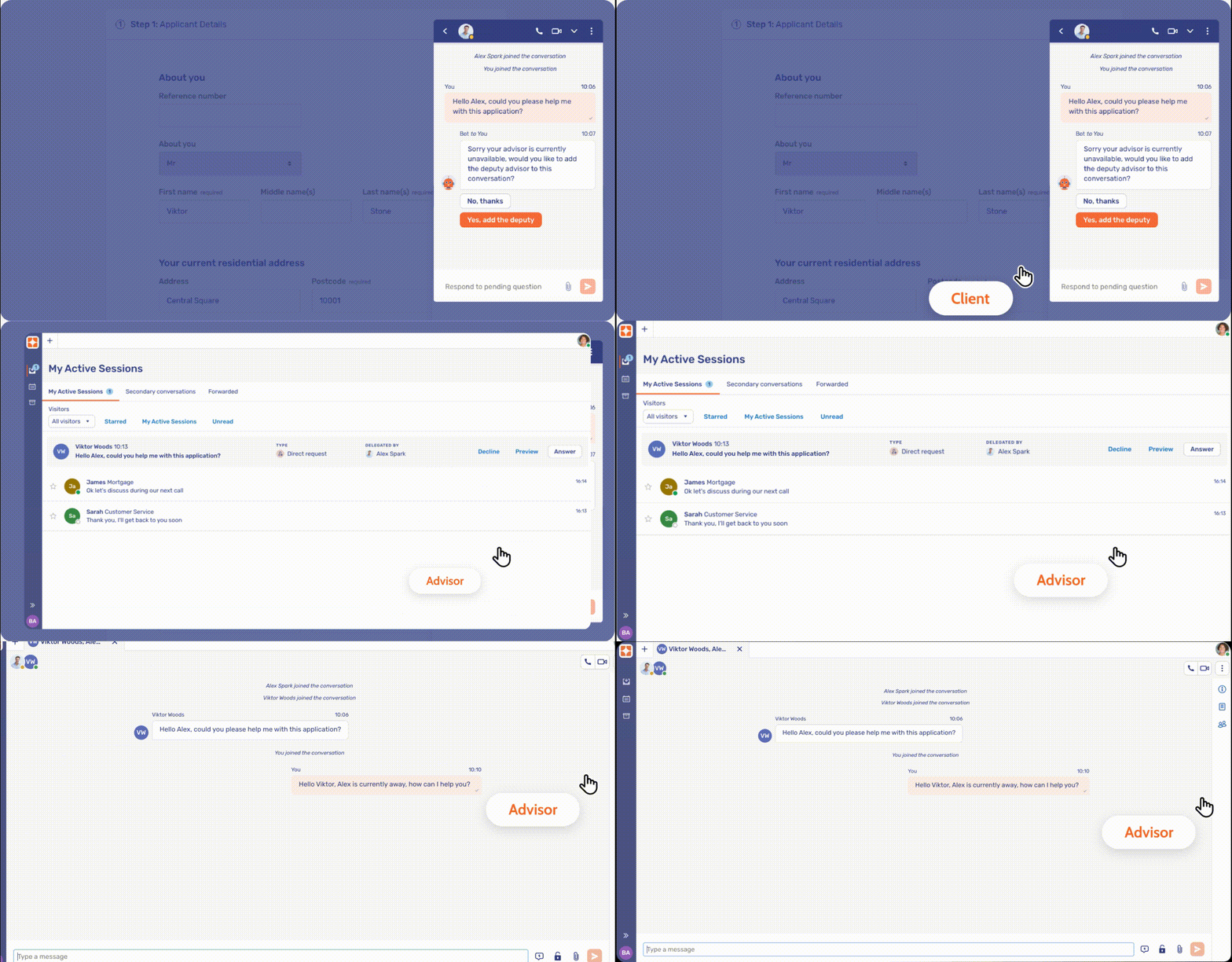
When an advisor is away or offline, clients can now seamlessly add a deputy advisor to the same conversation. This ensures that clients don’t experience delays, as the deputy advisor is immediately looped into the discussion with full context of the client’s request. The primary advisor remains updated, preserving continuity without compromising operational efficiency. Key highlights include:
- Optimal client experience: Clients are offered with the option to continue their conversation without waiting for their primary advisor to return.
- Inbox instead of Queue: Deputies receive the conversation directly in their Unblu Advisor Desk Inbox, eliminating the need for separate queue monitoring.
- Improved flexibility: This feature allows uninterrupted, long-running conversations, giving both clients and advisors the flexibility to continue the ongoing conversation when the primary advisor is temporarily unavailable.
Out-of-the-box WhatsApp and SMS Connector
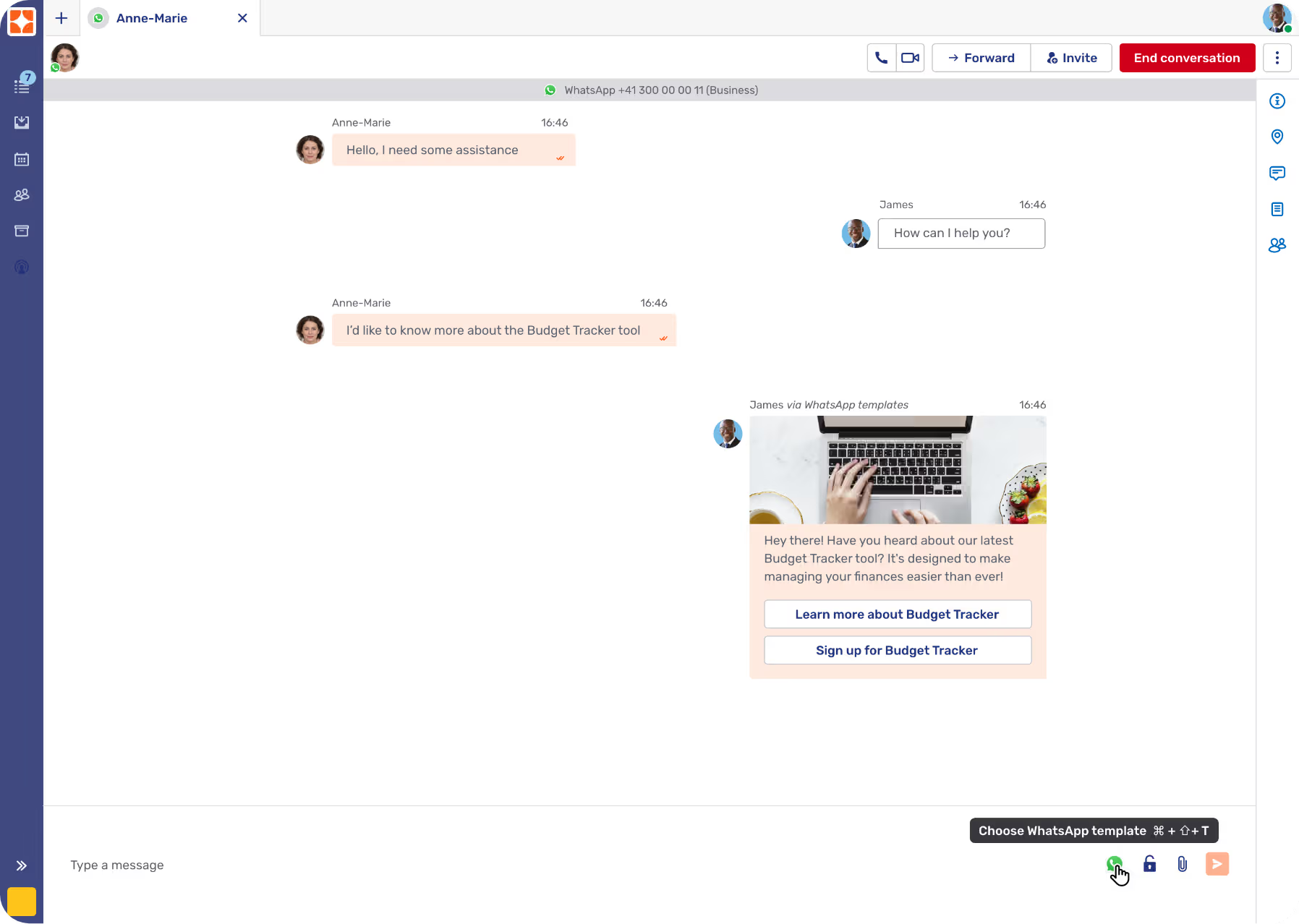
With the native connectors, enabling WhatsApp and SMS channels in your Unblu environment has never been easier. No middleware or custom development is required – just a seamless connection that empowers your organization to engage customers through one of the world’s most popular messaging platforms.
This integration allows your customers to communicate directly via WhatsApp or SMS, while your agents continue to manage interactions from the Unblu Agent Desk.
Additionally, agents can proactively initiate conversations with customers by sending template WhatsApp messages. These could be used to promote services, deliver product updates, or invite customers to engage with an agent for more personalized support.
Communicating via WhatsApp and SMS offers customers the ease and familiarity of a channel they know and trust, improving customer experience and enhancing engagement as a result.
Queue Status UI
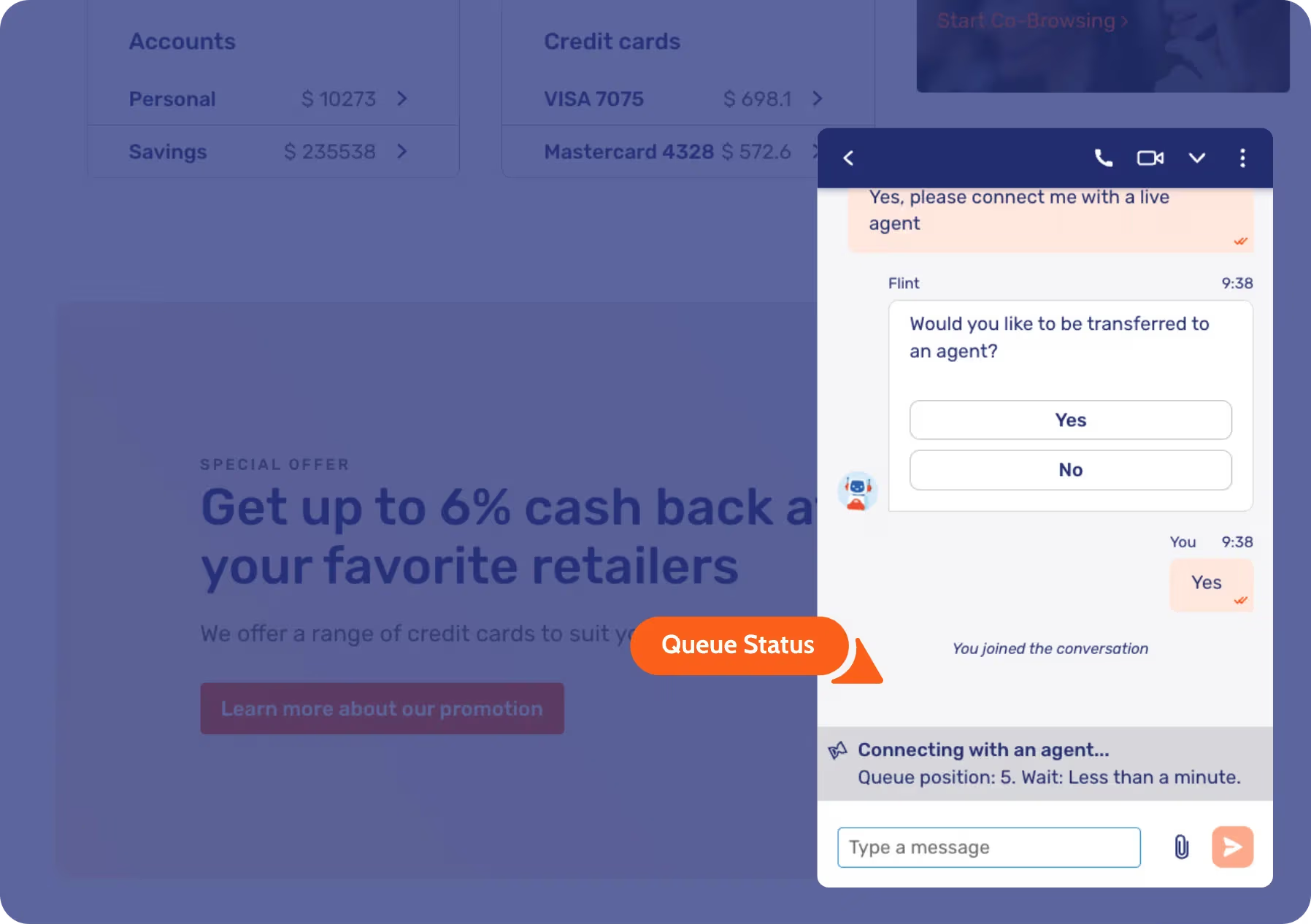
Customer requests matter, and keeping them informed is key to maintaining engagement. With the new Queue Status UI, you can now provide real-time updates to customers about their connection status with an agent. This feature displays either the approximate wait time or their current position in the queue, offering transparency and reassurance during high-traffic periods.
By giving customers clear expectations, the Queue Status UI reduces abandonment rates and boosts customer satisfaction. When customers know they’re in line and are informed about the wait time, they are more likely to remain engaged and wait for service, which ensures a positive customer experience.
Advisor Unavailable Indicator
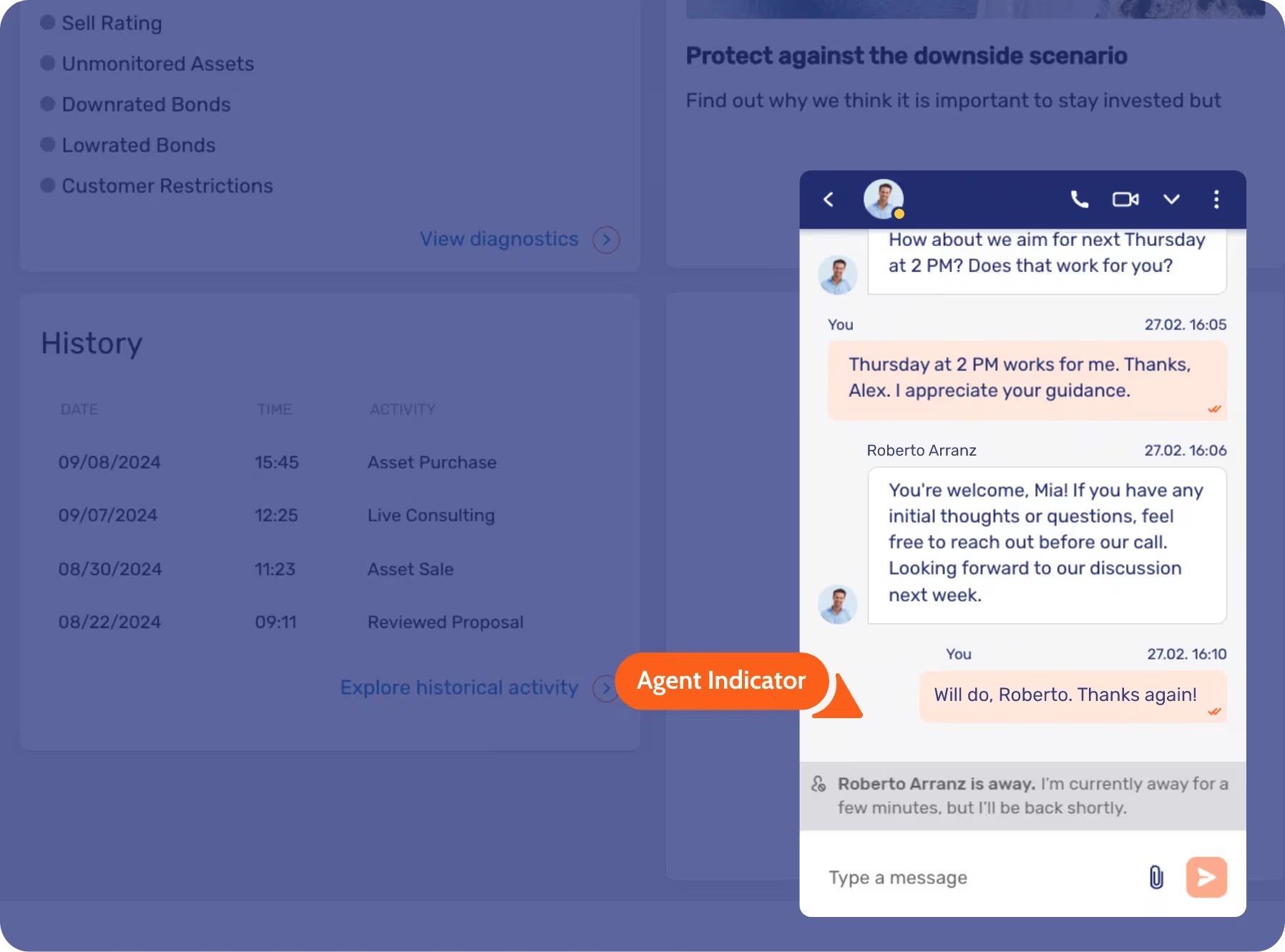
For ongoing, in-depth conversations between advisors and clients – such as those involving digital sales, investment proposals, or complex issue resolution – keeping clients informed is crucial. With the new Advisor Unavailable Indicator, clients will now be clearly notified when an advisor is temporarily unavailable, helping to prevent unnecessary wait times.
This new indicator features prominently in the client interface, and serves in addition to the existing online status indicator next to the advisor’s profile. Advisors can also personalize their “away” message, providing context or expected return times to further manage client expectations.
This enhancement ensures smoother communication during long, detailed conversations. It also helps maintain client satisfaction by reducing uncertainty and providing clear updates on advisor availability.
Notes in Customer Profiles
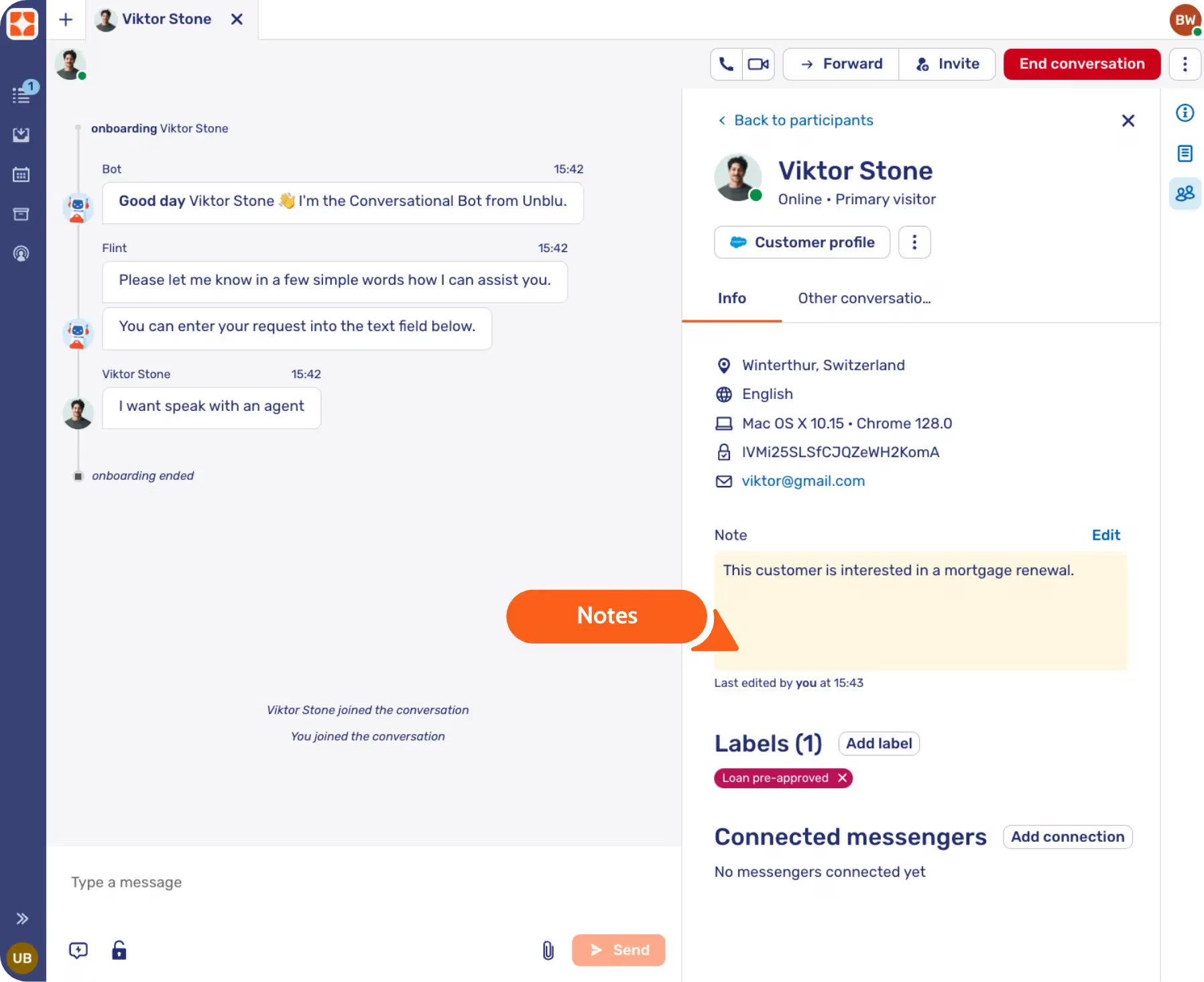
Empower your agents and advisors to better manage customer relationships through the new Note section within the customer profile. This feature allows agents to record key details about customer interactions, requests, or preferences, facilitating seamless internal communication across teams.
By leveraging this tool, agents can deliver a more personalized and efficient service. For example, when a customer reaches out to follow up on a previous inquiry, the assigned agent can instantly access the relevant notes – saving time and eliminating the need for repetitive questions. This not only improves the customer experience but also boosts the confidence and efficiency of your support team.
Each note is timestamped and tagged with the agent’s name, so your team will always know when the last update was made and by whom. This ensures that everyone is up-to-date with the most current information, fostering a collaborative environment that drives customer satisfaction.
Additionally, Unblu can be integrated with your CRM solution to synchronize these notes, maintaining a single source of truth across platforms and ensuring the continuity of customer information.
Video and voice call enhancements
The Video & Voice function now has an improved interface. The collaboration space has been completely revamped with a new view that merges with the call in progress. We have also added features such as improved pinning, background image replacement, and support for different layouts.
With the addition of Picture in Picture (PiP) mode, you can ensure that agents or advisors can always see the caller even when they navigate away from the main screen. For example, if they launch the screen sharing capabilities, the video call – including all call controls – will remain as a small, moveable window for easy access at all times.
Managing customer profiles and using labels for segmentation
Agents and advisors can easily create and manage customer profiles inside Unblu, with the option to connect or update external messenger contacts, which offers them a more complete view of the context and history of each customer. Not only can agents and advisors create several threads with the customer, but all previous interactions are visible to those with access to ensure a consistent experience.
The most versatile feature when managing profiles is labelling for segmenting customers, such as labelling customers with high upsell potential to offer more personalized services.
Additionally, with labels, we can define which customers are visible to which agents or advisors. For example, in a wealth context, conversations between a client and a relationship manager could contain private information that cannot be shared with the staff in the support team.
Collaborate and sign document during co-browsing
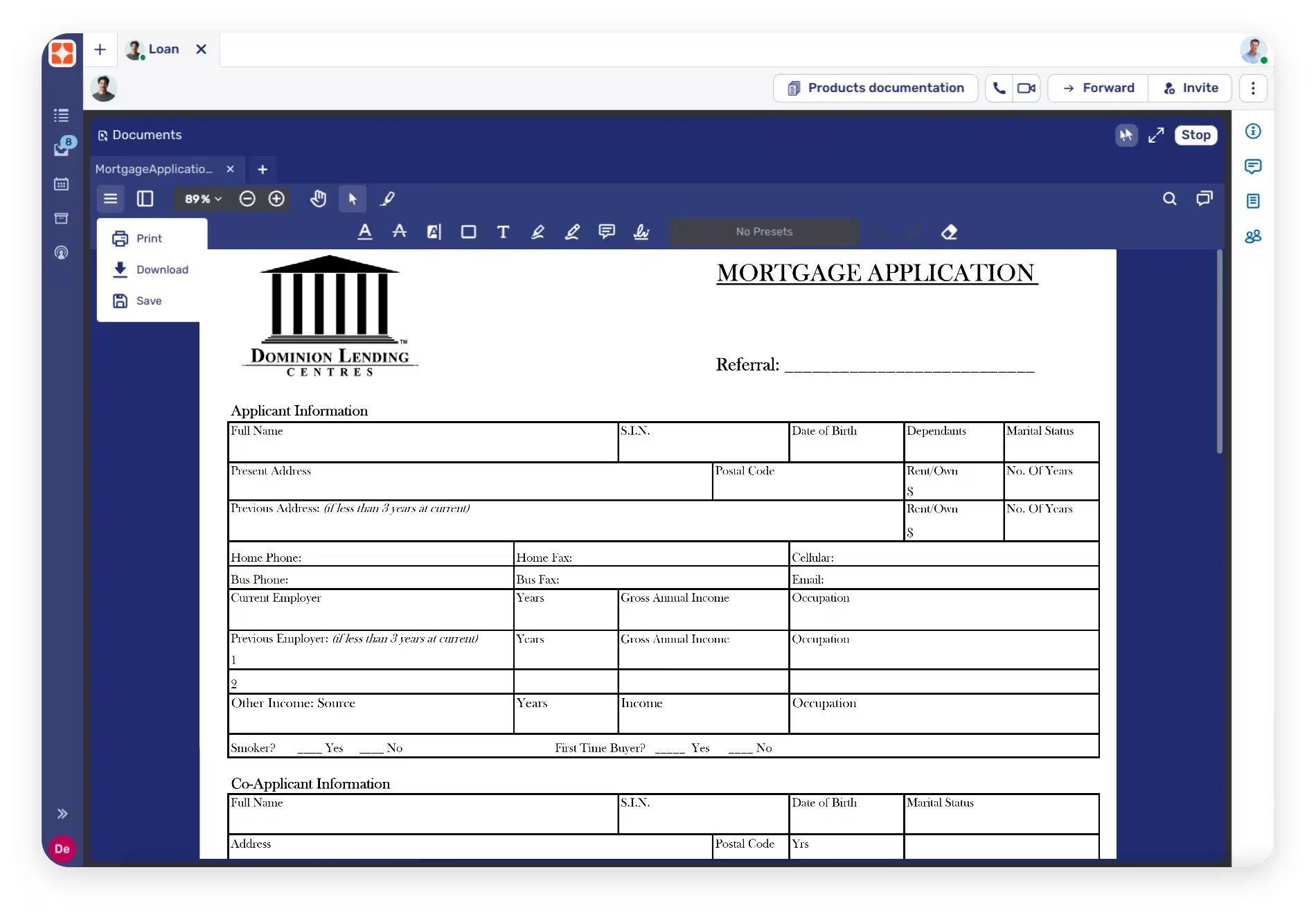
Unblu Spark 8 introduces major enhancements to our document collaboration capabilities, including an out-of-the-box signature tool during co-browsing.
Agents and customers can now utilize advanced collaboration tools, such as:
- Highlighting: Temporary and permanent highlighting to emphasize key points.
- Drawing and Marking: Annotate documents with freehand drawing or markings.
- Text and Comments: Add text notes and comments directly onto documents.
All updated documents can be saved into the conversation or downloaded for local use. These features support all common document types, including Microsoft Office documents and PDFs.
With our built-in digital signature, users can create signatures and apply them to documents during a document collaboration session. For customers who have logged into the banking platform, when single sign-on is in place, we automatically retain shared data such as timestamps for improved signature authenticity.
Unblu brings Unblu Spark to IBM Cloud for Financial Services
Today we are proud to announce that Unblu is available on IBM Cloud for Financial Services. With Unblu Spark on IBM Cloud for Financial Services, we are dedicated to helping financial services organizations drive transformation and create meaningful customer interactions.
Unblu Spark 8 is here!

We’re excited to introduce the latest update to our digital engagement platform: Unblu Spark 8!
This release marks a significant step forward in enhancing the way your teams interact with customers, providing a more seamless and authentic experience, with new functionalities such as customer-centric view, outbound messaging, third-party messaging connectors, document collaboration, and enhanced UX for video and voice calls.
Interact with back-end services using the Bot Actions API
The Bot Actions API enables your customers to initiate actions within external systems directly through conversations in Unblu. When interacting with the Unblu bot, customers can now effortlessly initiate transactions or trigger processes within their banking platform, CRM system, and other solutions. For example:
- Provide your customers with real-time access to their account balances, enhancing their financial visibility and control.
- Enable users to easily update personal details, such as addresses and other information, seamlessly within the conversation.
- Facilitate transactional activities, allowing customers to complete financial operations without leaving the conversation.
At Unblu, we prioritize the security and privacy of your customer data. It’s essential to note that the Bot Actions API is exclusively associated with our intent-based bot. Integrations with other solutions, such as your Core Banking system, are distinct from the LLM integration of our Knowledge Bot. This ensures that customer data remains secure, with no transfer to the LLM through the Intent Bot and Core Banking System integration.
By leveraging the Bot Actions API, you empower your customers to effortlessly accomplish routine tasks with human-like assistance around the clock. This not only enhances user experience but also liberates your agents to focus on more impactful and complex conversations, ultimately boosting overall operational efficiency.
Unblu Conversational AI offering on Microsoft Azure OpenAI
Unblu now seamlessly integrates with Azure OpenAI, combining the innovation of OpenAI’s models with the robust security features of Microsoft Azure.
With Azure OpenAI, you can now benefit from regional availability in key business hubs such as Switzerland, France, Canada, USA, and the UK. This ensures that your organization has full control over data residency, offering peace of mind by preventing data from being processed in third countries, and maintaining compliance with regional and national regulations in data protection and privacy.
Moreover, Azure OpenAI ensures that your prompts (inputs), completions (outputs), embeddings, and training data will not be available to OpenAI or other customers, nor will they be used to improve OpenAI models or other third party services. Your fine-tuned Azure OpenAI models are available exclusively for your use.
Experience the power of conversational AI with the security and flexibility of Microsoft Azure through Unblu’s integration with Azure OpenAI.
Schedule Unblu Conversations with your preferred calendar provider
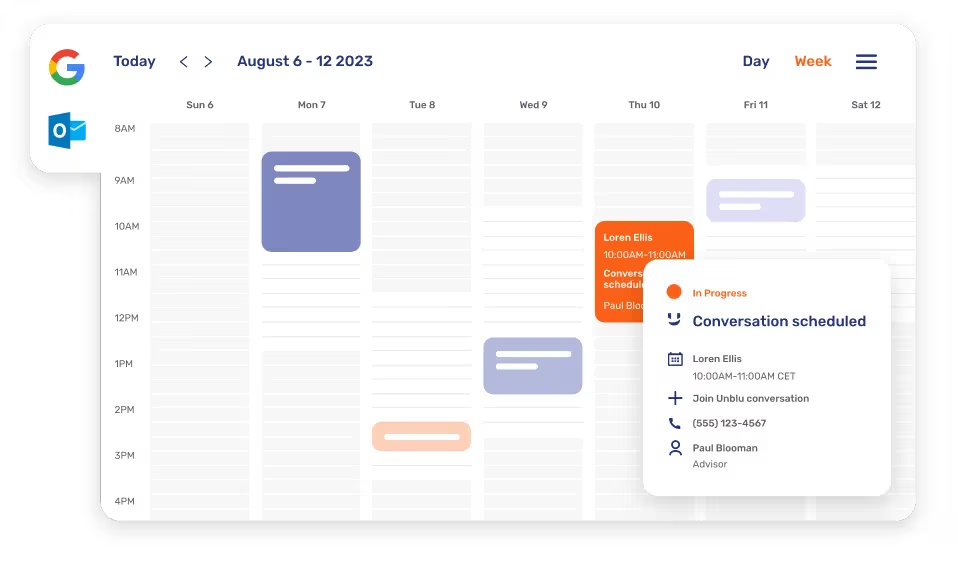
In addition to our Outlook calendar integration, organizations leveraging Google Workspace can now benefit from our Google Calendar add-on to streamline the meeting scheduling process. This out-of-the-box integration empowers advisors to schedule Unblu conversations directly from Google Calendar.
The add-on allows for the easy inclusion of an Unblu link in meeting invites, providing both external and internal participants a secure channel to access and explore the full suite of Unblu feature, and benefits from our highly secured solution such as customer identification via online banking, flexible recording options, and our native call solution.
Whether it’s an ad-hoc meeting or recurring touchpoints with the clients, give your advisors the convenience of managing customer interactions in a centralized way and stay compliant with regulatory requirements.
Brandable agent mobile app
Facilitate seamless communication between advisors and clients with Unblu’s brandable mobile app.
Key Features:
Intuitive in-app calling and texting
Empower your advisors with an easy-to-use app that provides an intuitive in-app calling or texting experience.
Out-of-the-box convenience
Our brandable mobile app is readily available for both iOS and Android platforms, requiring no additional development or maintenance efforts on your end. We also take care of the app listing process on app stores.
Tailored to your brand
Unblu understands the importance of maintaining a consistent brand image. We will collaborate with you to match the app’s design to your branding, ensuring a seamless extension of your institution’s identity.
Compliance at your fingertips
Our mobile app is designed to keep your advisors connected with clients on-the-go while ensuring full compliance with industry regulations.
Trigger workflows and actions in other platforms using the Unblu custom action API
Our custom action API is designed to effortlessly initiate workflows and execute actions directly from Unblu across key platforms, such as CRM, core banking systems, and e-signature solutions.
This feature offers three types of custom actions:
- Trigger an action from the conversation level. For example, equip your agents with a one-click button inside the Agent Desk to select and send documents to the visitor, while managing the document in a centralized repository such as your existing Enterprise Content Management solution.
- Trigger an action based on the participant’s information. For example, you could add a button on the Unblu agent desk for the agents to open a participant’s portfolio in their CRM application.
- Trigger an action from a message in a conversation. For example, relationship managers can begin an electronic signature process from a file uploaded into the conversation.
Experience the enhanced efficiency and precision our custom action API offers, ensuring a more seamless and streamlined workflow for your team.
Integrate Unblu into MS Teams for agents and advisors
You can now integrate the Unblu agent desk into MS teams. Do your agents prefer MS Teams? Retain the familiar interface for internal and customer communications – with the added power of Unblu.
The Unblu MS Teams integration ensures access to a centralized platform to securely address customer requests. Benefit from Unblu’s Live Chat, voice & video calls, and next-level Co-Browsing collaboration capabilities to provide a superior support experience.
Consolidate notifications into one channel and never miss a message or call from the customers.
Maximize Live Chat efficiency with our agent Bot Sidekick
Empower your agents and advisors with swift access to your organization’s knowledge base.
The Unblu Bot Sidekick blurs the line between Conversational AI and Live Chat. By offering human agents AI-generated suggested responses, agents can boost their efficiency and maximize resolutions.
Here’s how it works.
- An agent or advisor receives a query or request.
- A scanning process automatically begins.
- The instant support allows agents or advisors to reduce the average handling time – and increase their first contact resolution rate.
File Upload Interceptor API
The new file upload interceptor API builds on Unblu’s track record of proactive security measures. Used alongside our existing message interceptor, you can perform virus scanning and other security checks to protect the system and users from potential harmful files.
Here’s how it works.
- A document is uploaded to a conversation.
- A scanning process automatically begins.
- Any files that may contain viruses, malware or other malicious content are identified and rejected.
The upload interceptor API also allows you to scan and reject documents containing sensitive information to remain compliant with your industry or jurisdiction’s legal requirements – while reducing the risk of users sharing compromised files.
Integrate Unblu into Salesforce to augment calls and chats
Unblu’s out-of-the-box app for Salesforce is published on the AppExchange.
Enhance your customer and agent experience:
- Provide agents with visual context on Salesforce chat during customer interactions.
- Augment existing phone calls while allowing agents to stay on relevant pages in Salesforce and benefit from the 360 degree view of the customer.
- Synchronize Unblu data with Salesforce – and store all communication history in a centralized repository.
Leverage Co-Browsing in Salesforce
Enrich your existing channels with Co-Browsing and video calls to reduce chat and call handling time and increase conversion rates.
Join conversations using phone numbers with our SIP Dial-In
Internet connectivity issues happen, but that doesn’t mean the scheduled meeting or ad-hoc voice or video call should end.
With SIP Dial-In, agents and visitors can join the session using a phone number and keep the conversation flowing.
- No internet connection? Use a public dial-in number to join the conversation.
- Want to keep the video or Co-Browsing sessions going? Join the conversation using a personal dial-in number just for the audio.
Using different bot personas to provide a more humanized service
Define your bot’s tone and personality using our Conversational AI Bot Persona feature.
Particular customer demographics have common requests, traits, and preferences. Speak their language by developing a bot persona that boosts engagement and satisfaction.
Whether it is solution-oriented, trust-inspiring, or easy going and friendly, match your organization’s branding strategy to provide accurate responses in the right tone and language.
No Results Found
The selected filters did not return any matching content. Please adjust or broaden your filter criteria to view available content.
